In today’s e-commerce-driven world, Amazon stands out as one of the most popular and profitable platforms for selling products online. With millions of active users and a global reach, it offers a massive opportunity for businesses of all sizes to grow. If you're thinking about starting an online business, selling on Amazon could be the perfect avenue to explore.
One of the first steps in becoming an Amazon seller is registering for an Amazon Seller Account. Whether you're an experienced business owner or just starting, understanding the registration process can save you time and ensure that your account setup is successful. In this blog post, we’ll walk you through everything you need to know about Amazon Seller Account registration, with helpful insights from Chern & Co, an expert in e-commerce business consulting.
What is an Amazon Seller Account?
An Amazon Seller Account is the gateway for individuals and businesses to list and sell products directly on Amazon's platform. By creating a Seller Account, you gain access to Amazon’s vast customer base, marketing tools, and robust logistics infrastructure through services like Fulfillment by Amazon (FBA).
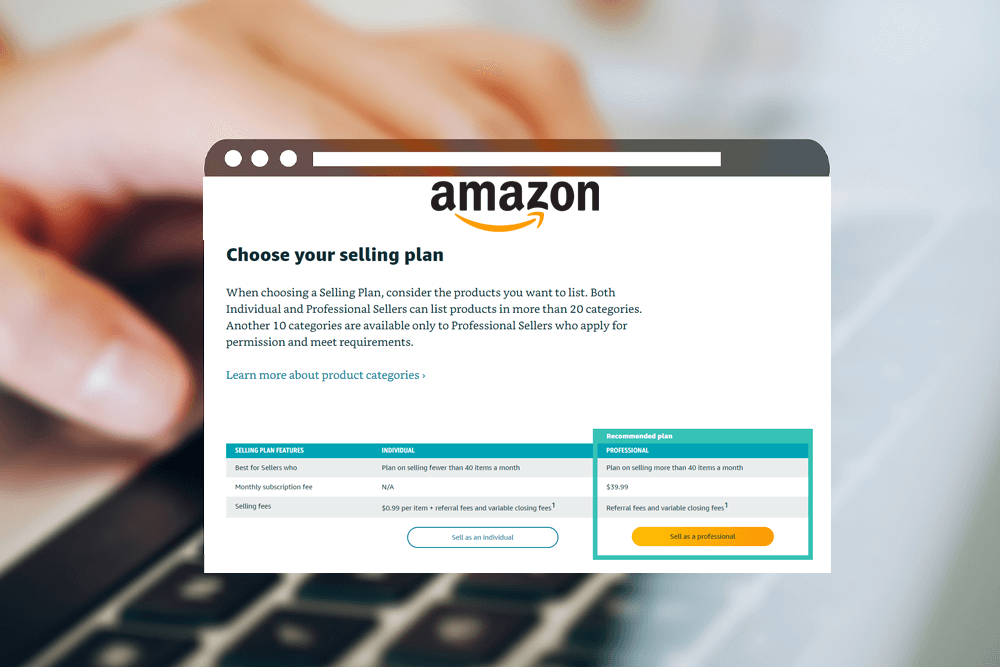
There are two types of Amazon Seller Accounts:
Individual Seller Account: Best for those just starting out or planning to sell fewer than 40 items per month. There are no monthly fees, but you pay a per-item fee for each sale.
Professional Seller Account: Designed for businesses that plan to sell more than 40 items per month. It has a monthly subscription fee but comes with additional features, such as access to advanced reporting, advertising tools, and the ability to list in more categories.
Step-by-Step Guide to Amazon Seller Account Registration
1. Prepare Your Information Before you start the registration process, make sure you have the following information ready:
-Business Name and Address: Whether you’re an individual or a company, Amazon requires your business name and address.
-Tax Information: You will need to provide a tax ID or Social Security Number (SSN) for U.S. sellers.
-Bank Account Information: Amazon requires a valid bank account for payouts. Make sure your bank details are correct.
-Credit Card Information: A valid credit card will be needed for billing purposes.
-Phone Number: Amazon will contact you to verify your identity and ensure a smooth setup.
2. Visit the Amazon Seller Central Website
Go to Amazon Seller Central and click on “Register Now.” You’ll be prompted to either sign in with an existing Amazon account or create a new one.
3. Select Your Seller Plan
Amazon will ask you to choose between an Individual or Professional Seller account. If you’re serious about growing your business, the Professional account might be the better choice, as it offers access to more features and benefits.
4. Provide Business Information
Next, you'll need to enter your business details. This includes your business name, address, tax information, and phone number. If you're an individual seller, you can use your personal details.
5. Verify Your Identity
To ensure that you are a legitimate seller, Amazon will require you to verify your identity. This step may involve uploading documents such as a government-issued ID, business licenses, or tax documents. Amazon will also call the phone number you provided for an automated verification.
6. Set Up Your Payment Information
Amazon will ask you to provide bank account details for receiving payments. They’ll also request a valid credit card to cover any fees associated with selling.
7. Create Your Seller Profile
After verifying your details, you will be asked to create your Seller Profile, which includes your store name, logo, and a brief description of your business. Be sure to create a unique and professional profile to stand out to customers.
8. List Your Products
Now that your account is set up, you can start listing your products. Amazon offers various ways to list your inventory, including bulk uploading using templates or individually listing each product through the Seller Central interface. Chern & Co recommends optimizing your product listings with high-quality images, compelling titles, and detailed descriptions to attract buyers and boost sales.
9. Choose Your Fulfillment Method
You can fulfill orders yourself (Fulfillment by Merchant) or let Amazon handle it through Fulfillment by Amazon (FBA). With FBA, Amazon takes care of storage, packing, and shipping, allowing you to focus more on growing your business. While FBA comes with additional fees, it can significantly improve your order fulfillment process and customer satisfaction.
10. Launch Your Store
Once your products are listed and your fulfillment method is set, you’re ready to go live. Chern & Co advises new sellers to start small, gradually scale up, and constantly monitor performance to make necessary adjustments.
Common Pitfalls to Avoid
When setting up your Amazon Seller Account, it's essential to be aware of potential challenges that could delay your registration or hinder your success on the platform. Here are a few common mistakes to avoid:
Incomplete Documentation: Ensure that all required documents are uploaded correctly and completely. Missing or incorrect documents can delay your verification.
Choosing the Wrong Seller Plan: If you plan to sell more than 40 items per month, don’t opt for the Individual Seller Account. The Professional plan provides more tools and opportunities for growth.
Ignoring Product Listings Optimization: High-quality images, SEO-friendly titles, and detailed descriptions are crucial to attracting customers. Take the time to optimize your listings for maximum visibility.
Not Understanding Amazon Fees: Be sure to familiarize yourself with Amazon’s fee structure. Selling on Amazon isn’t free, and understanding the costs associated with each sale is critical for profitability.
Why Work with Chern & Co?
Navigating the world of Amazon Seller Account registration and management can be overwhelming, especially for new business owners.
That’s where Chern & Co comes in. As a leading e-commerce consultancy, Chern & Co specializes in helping businesses streamline their Amazon operations, from account setup to optimizing product listings and maximizing sales. Their team of experts provides personalized guidance, helping you avoid common pitfalls, develop effective marketing strategies, and scale your Amazon business for long-term success.
Whether you’re just starting or looking to optimize your current Amazon store, Chern & Co offers tailored strategies and support to ensure that your journey on Amazon is smooth and profitable.
Conclusion
Registering for an Amazon Seller Account is a straightforward process, but it requires careful attention to detail to ensure success. By following the steps outlined above and avoiding common mistakes, you can set up your account and start selling on one of the world’s largest e-commerce platforms. If you want expert help along the way, Chern & Co is a valuable resource to guide you through the complexities of Amazon selling and take your business to the next level.
Now that you know how to register and set up your Amazon Seller Account, you’re one step closer to tapping into Amazon’s vast marketplace and growing your business. Happy selling!